
On this page
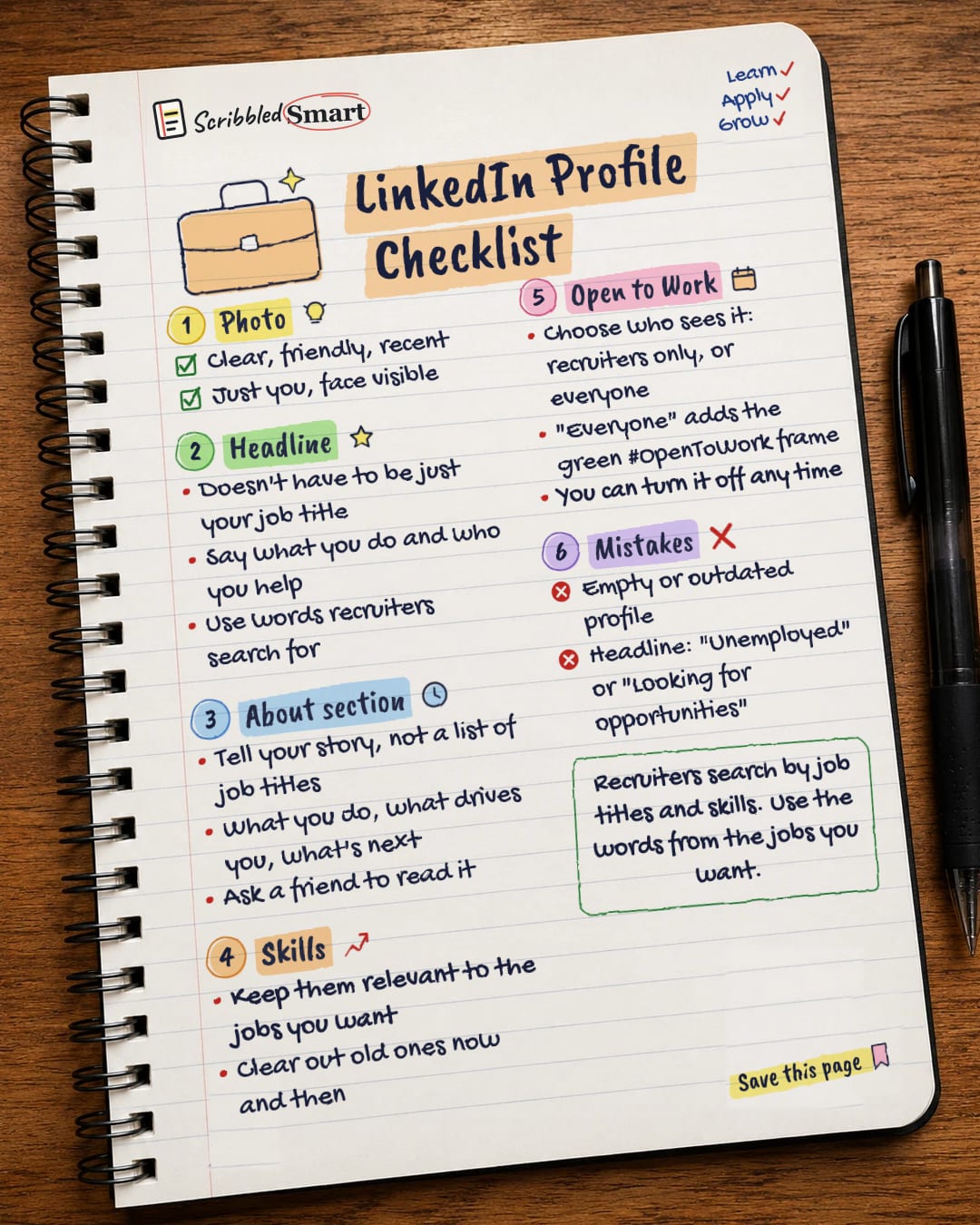
This LinkedIn profile checklist covers five key parts: a clear photo, a headline that says what you do, an About section that tells your story, relevant skills, and the right Open to Work setting. Recruiters search by job titles and skills, so the words you choose can affect whether you turn up. Work through the list below in one sitting and your profile will be in good shape.
1. Your photo
Pick a clear, recent photo where your face is easy to see. LinkedIn's own advice on building a better profile recommends a photo like this.
A few simple checks:
- ✓ Clear: in focus and well lit.
- ✓ Recent: LinkedIn says it should look like you.
- ✓ Your face fills the frame: LinkedIn suggests your face takes up around 60% of the picture.
- ✓ Friendly: LinkedIn's tip is to "smile with your eyes".
2. What should you put in your LinkedIn headline?
Your headline is the line under your name, and it can say more than your job title. LinkedIn's own blog puts it plainly: "There's no rule that says the description at the top of your profile page has to be just a job title."
Use that space to say:
- What you do, for example "Customer service adviser".
- Who you help or what you're good at.
- The words recruiters search for. Career sites that cover LinkedIn note that recruiters search for specific job titles and skills. Look at a few adverts for the jobs you want and use the same words, where they're true for you.
What not to put in your headline
Avoid a headline that only says "Unemployed" or "Looking for opportunities". It tells a recruiter nothing about what you can do, and it doesn't contain the job titles or skills they search for. Some career advice also warns against leading your headline with "open to work". There's a separate setting for that (see section 5).
3. How do you write a good About section?
The About section is where you tell your story in your own words, not repeat a list of job titles. LinkedIn's blog suggests telling your story and getting someone else to read it.
A simple way to structure it:
- What you do now, or what you're trained in.
- What drives you: the part of the work you enjoy, or why you chose this field.
- What's next: the kind of role or project you're looking for.
Then ask a friend to read it. They'll spot anything that's unclear, too long or doesn't sound like you.
If you've already written a strong introduction for your CV, it can be a good starting point. Our guide on how to write a CV that works explains how to write those few opening lines.
4. Your skills
Your skills list should match the jobs you want, not every job you've ever done. LinkedIn's blog advises keeping your skills relevant and clearing them out from time to time.
Ask yourself:
- Do these skills appear in the adverts for jobs I want?
- Are there old skills I no longer use, or don't want to be hired for?
- Are any important skills missing?
You may have seen LinkedIn claims that profiles with more skills get more attention. We've left those numbers out, because LinkedIn hasn't published how it worked them out.
5. Who sees your Open to Work setting?
Open to Work tells recruiters you're looking, and you control who sees it. According to LinkedIn Help:
| Who sees it | What it looks like |
|---|---|
| Recruiters only | No change to your public profile |
| All LinkedIn members (including people at your current company) | An #OpenToWork frame is added to your profile photo |
You can edit or remove the setting at any time. If you're job hunting while still employed, "recruiters only" is the more private choice, since the frame is only added when you share with everyone. Even then, LinkedIn says it tries to hide your status from recruiters at your current company but can't guarantee complete privacy.
LinkedIn profile checklist: mistakes to avoid
- ✗ An empty or outdated profile. If your last job was three roles ago, recruiters can't see who you are now.
- ✗ A headline that only says "Unemployed" or "Looking for opportunities". Say what you do instead.
- ✗ Skills that don't match the jobs you want.
- ✗ An About section that's just a list of job titles. Tell your story.
Related reading
- Why acquaintances get you jobs: the LinkedIn study showing why people you barely know matter.
- How to spot a job scam: fake recruiters also use LinkedIn, so know the warning signs.
- How to write a cover letter: another place where matching the advert's words pays off.
Sources
- LinkedIn: Steps to a better LinkedIn profile
- LinkedIn Help: Let recruiters know you're Open to Work
- LinkedIn Help: Edit the introduction section
- LinkedIn Help: Your LinkedIn profile
How we checked this
Every fact in this article comes from the 4 sources listed above, checked against official or peer-reviewed sources where possible. AI tools help with drafting; a person checks every fact against the sources. How we research
- Published and checked
- Next check
- Yearly (LinkedIn features change)
Spotted a mistake? Tell us and we'll fix it and log it on the corrections page.


